



WebCrims is the free public search tool run by the New York State Unified Court System that shows information on active criminal cases with upcoming court dates. If you need to check a court date, confirm a case status, or look up a defendant’s pending case in New York, this tool is usually your fastest option.
- What Is WebCrims and What Does It Show
- Who Can Use WebCrims
- Which Counties and Courts WebCrims Covers
- How to Search WebCrims, Step by Step
- Option 1: Search by Case Identifier
- Option 2: Search by Defendant Name
- Option 3: Search by Court Calendar
- WebCrims Attorney Login and Services
- Understanding WebCrims Case Status Terms
- What WebCrims Does Not Show (Sealed Records and CPL 160.50)
- Common Search Problems and How to Fix Them
- WebCrims vs Other NY eCourts Tools
- What to Do If You Cannot Find a Case
- Is WebCrims Free and Safe to Use
- FAQ
- Conclusion
This guide walks through everything WebCrims can do, everything it cannot do, and how to search it correctly the first time. We will also cover what happens to a case once it closes, since that trips up a lot of first time users.
What Is WebCrims and What Does It Show
WebCrims (also written as WebCriminal) is an online portal built by the New York State Unified Court System. It gives the public a way to look up criminal cases without visiting a courthouse in person.
The system focuses on active cases with future court appearance dates. That is its main job. It is not built to be a full criminal history database.
On a typical case record, WebCrims can show you:
- The defendant’s name
- The case or docket number
- The charges filed
- The court part and judge
- Upcoming appearance dates
- The current case status (like pending or adjourned)
Example scenario: Say a friend was arraigned last week in Queens Criminal Court and told you the case number. You can enter that number in WebCrims and see the next scheduled court date without calling the clerk’s office.
Who Can Use WebCrims
Anyone can use the public search on WebCrims. You do not need to create an account or prove any connection to the case.
There is a separate login area for attorneys, which unlocks additional case information tied to their registered clients. Attorneys sign in through the official portal here: WebCrims Attorney Login.
Court employees and other authorized users may also have expanded access based on their role, but that access is managed internally by the Office of Court Administration and is not something the general public can request.
If you are a defendant trying to understand your own case, or you are researching representation, our guide to choosing a criminal defense attorney is a good next stop after you confirm your court dates here.
Which Counties and Courts WebCrims Covers
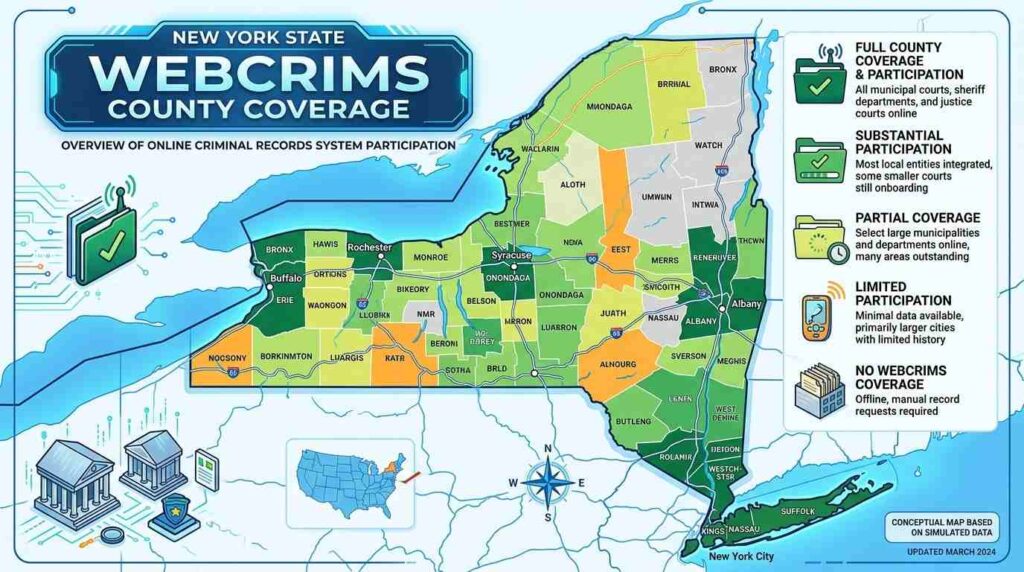
WebCrims does not cover every court in New York State. Coverage has grown over time, but it is still limited to specific courts of criminal jurisdiction.
| Region | Courts Covered |
|---|---|
| New York City | Criminal Court in all five boroughs, plus summons cases citywide |
| Nassau County | District Court and County Court |
| Suffolk County | District Court and County Court |
| Ninth Judicial District | County Courts in Westchester, Rockland, Orange, Putnam, and Dutchess |
| Erie County | County Court |
| Buffalo | Buffalo City Court |
What if your case is in a county not listed here? Not every local town or village justice court is on WebCrims. In that case, you will need to contact the specific court clerk directly, since smaller courts often keep their own local case files.
How to Search WebCrims, Step by Step
WebCrims offers three main ways to search, and each one works best in a different situation.
Option 1: Search by Case Identifier
Use this when you already have the case number or summons number.
- Go to the official WebCrims search page.
- Select Case Identifier.
- Enter the case number or summons number exactly as it appears on your paperwork.
- Select the correct court type if prompted.
- Submit the search.
Tip: If your case number includes letters and numbers, type it exactly. A single wrong digit will return no results, even if the case exists.
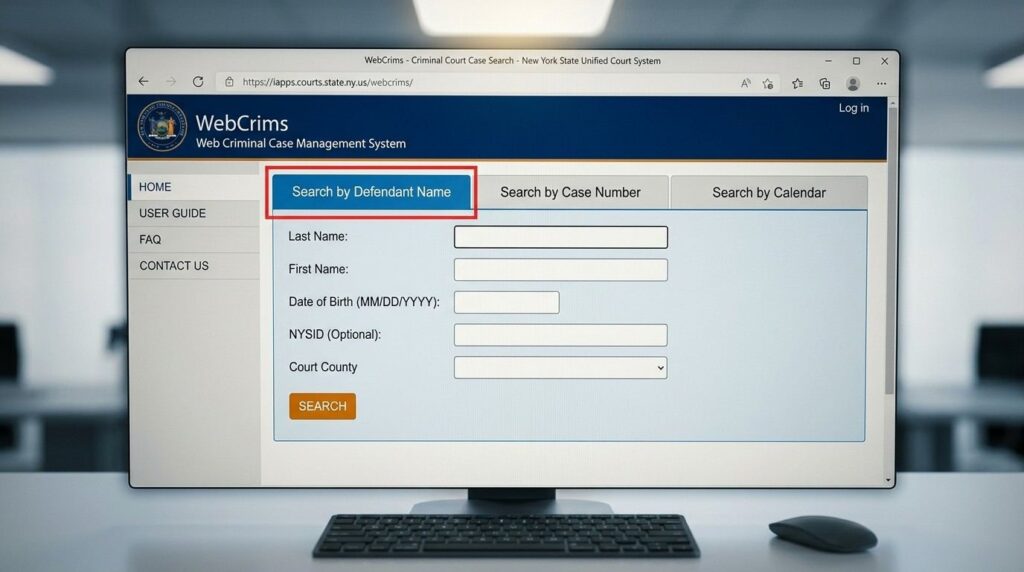
Option 2: Search by Defendant Name
Use this when you know the person’s name but not the case number.
- Select Defendant Name.
- Enter the first and last name, or the corporation name for a business case.
- Choose the county or court, since narrowing the search reduces false matches.
- Review the list of results carefully. Common names often return several people.
Option 3: Search by Court Calendar
Use this when you want to see everything scheduled for a specific part or judge on a given day.
- Select Court Calendar.
- Choose the court, the part, or the judge (available for Supreme and County Court).
- Pick the date you want to view.
Quick reference table:
| Search Type | Best When You Have | Typical Result |
|---|---|---|
| Case Identifier | A case or summons number | One exact case |
| Defendant Name | A person’s full name | A list of matching cases |
| Court Calendar | A date, part, or judge | A full day’s schedule |
WebCrims Attorney Login and Services
Licensed attorneys get access to a dedicated portal beyond the basic public search. This account ties into the attorney’s registered cases and can support case tracking across multiple clients.
To sign in, an attorney needs their registered username and password through the official page: WebCrims Attorney Login.
Attorneys who have never activated their online account should complete registration through the official New York State court system before attempting to log in for the first time. If you are a member of the public looking for general legal services rather than an attorney portal, our legal services directory can point you toward the right kind of help.
Understanding WebCrims Case Status Terms
Case status labels carry real legal meaning under the New York Criminal Procedure Law (CPL). Misreading one can lead to wrong conclusions about whether a case is still open.
| Status Shown | What It Actually Means |
|---|---|
| Pending | The case is active. No final decision has been made yet. |
| Adjourned | A scheduled appearance was pushed to a new date. |
| Disposed | The case reached a final outcome, such as a plea, verdict, dismissal, or completed ACD. |
| Bench Warrant | The defendant did not appear and the court issued a warrant. |
Common mistake to avoid: Treating “disposed” as if the case is still ongoing. Once a case is disposed, there are no further scheduled hearings tied to it on WebCrims.
What WebCrims Does Not Show (Sealed Records and CPL 160.50)
This is the section most people miss, so read it carefully.
WebCrims removes a case from public search once it reaches final disposition in the defendant’s favor. This is not a glitch. It is required by law.
Under New York Criminal Procedure Law Section 160.50, when a criminal case ends in favor of the accused, meaning it results in a dismissal, an acquittal, or certain other favorable outcomes, the court must seal the record. Once sealed, the case disappears from WebCrims entirely.
Other categories that will never show up on WebCrims include:
- Youthful Offender (YO) adjudications, which are confidential by law
- Family Court proceedings, which are handled through a separate system called WebFamily
- Civil cases, which belong to WebCivil Local or WebCivil Supreme
- Records that were never entered into the WebCrims system by the court clerk
What if you need a sealed record? Only specific people can access sealed records, including the defendant themselves or their designated attorney. If you were the subject of the case, you can request confirmation of a seal from the NYS Division of Criminal Justice Services (DCJS), and DCJS explains the process for requesting your own criminal history record if you need to review it.
For historical closed cases that were not sealed, you generally need to contact the specific court clerk’s office directly, since WebCrims only maintains records tied to open, future court activity.
Common Search Problems and How to Fix Them
Even a correct case can be hard to find if you make a small entry error. Here are the issues that come up most often.
Problem: No results for a name you know is correct. Try searching with just the last name, or check for alternate spellings. Court clerks sometimes enter names differently than they appear on ID documents.
Problem: Too many results for a common name. Narrow the search by selecting a specific county or court. If you know the approximate arrest date, that can also help you pick the right match from the list.
Problem: The case number search returns nothing. Double check every character, including letters, dashes, and leading zeros. Confirm you selected the matching court type, since the same number format can exist in different courts.
Problem: The case used to show up but does not anymore. This usually means the case reached final disposition in the defendant’s favor and was sealed under CPL 160.50, as covered in the section above.
WebCrims vs Other NY eCourts Tools
WebCrims is just one piece of a larger family of public access tools built by the New York State Unified Court System. Confusing these tools is one of the most common mistakes people make.
| Tool | What It Covers |
|---|---|
| WebCrims (WebCriminal) | Criminal cases with future appearance dates |
| WebCivil Local | Local civil court cases |
| WebCivil Supreme | Supreme Court civil cases |
| WebFamily | Family Court proceedings |
| eTrack | Email notifications for case activity across civil and criminal courts |
If you searched WebCrims and found nothing, but you know there is an open case, check whether it actually belongs in one of these other systems instead. A landlord tenant dispute, a divorce filing, or a custody matter will never appear in WebCrims because they are not criminal cases.
What to Do If You Cannot Find a Case
If you have tried every spelling variation and search type and still cannot locate a case, here is what to try next.
- Contact the court clerk directly. Clerks can confirm whether a case exists even if it is not showing online.
- Check if the case is sealed. A favorable disposition under CPL 160.50 removes the case from public view.
- Confirm you have the right court system. Family Court and civil cases will not appear on WebCrims.
- Order an official record. For a fee, you can request a Criminal History Record Search (CHRS) through the Division of Criminal Justice Services for disposition information tied to your own record.
- Speak with an attorney. If the case affects you personally, a licensed attorney can request records that are not available to the public, and our legal services resources can help you find where to start.
Is WebCrims Free and Safe to Use
Yes. WebCrims is completely free to search, and no account is required for the public search options.
The site does require you to accept a terms of use agreement, and it typically includes a security check before you can search. This is standard practice for a public government portal and does not put your information at risk simply by using the search.
Keep in mind that WebCrims only shows what the court clerk has entered into the system. It is an official government resource, but it is not a substitute for confirming details directly with the court when a hearing date really matters. For broader background on how these tools fit together, our general law resources cover related New York court topics.
FAQ
Is WebCrims the same as a criminal background check?
No. WebCrims only shows active cases with future court dates. A full background check pulls from other sources, including sealed record verifications and multi-state databases that WebCrims does not access.
Can I search WebCrims without creating an account?
Yes. The public search options do not require registration. Only the attorney portal requires a login.
Why did a case I found before disappear from WebCrims?
It most likely reached final disposition in favor of the accused and was sealed under CPL 160.50, which removes it from public search by law.
Does WebCrims cover every county in New York State?
No. Coverage is limited to New York City, Nassau, Suffolk, the Ninth Judicial District counties, Erie County, and Buffalo City Court. Smaller local courts outside these areas may not appear.
Can I see civil or family court cases on WebCrims?
No. Civil cases appear on WebCivil Local or WebCivil Supreme, and family matters appear on WebFamily. WebCrims covers criminal cases only.
What should I do if I misspell a name and get no results?
Try alternate spellings, search by last name only, or narrow the search by county. Court clerks do not always enter names the same way they appear on identification documents.
Is there a mobile version of WebCrims?
Yes, a mobile friendly version of the search is available, so you can check case information from a phone or tablet without needing a desktop computer.
How do I find out if my own case was sealed correctly?
You can request seal verification from the Division of Criminal Justice Services by submitting your name, date of birth, and a copy of the court’s seal order.
Conclusion
WebCrims remains the fastest official way to check an active New York criminal case, whether you have a case number, a defendant’s name, or just a court date to confirm. It covers New York City, Nassau, Suffolk, the Ninth Judicial District, Erie County, and Buffalo, but it will not show sealed cases, family matters, or civil disputes.
If a search comes up empty, do not assume the case never existed. Check your spelling, confirm you are using the right eCourts tool, and remember that a favorable disposition under CPL 160.50 removes a case from public view by design.